> For the complete documentation index, see [llms.txt](https://docs.ethgas.com/llms.txt). Markdown versions of documentation pages are available by appending `.md` to page URLs; this page is available as [Markdown](https://docs.ethgas.com/foundation/foundation-faq.md).
# Foundation FAQ
Got questions? We've got answers.
### GeneralTGE TimelineCommunity Airdrop: Season 1EligibilityClaiming & Auto-StakeStaking
### General
What are the official $GWEI and veGWEI Token Contract Address?
**Official $GWEI Contract Address:**
* Ethereum Mainnet: [`0x2798b1cC5A993085E8A9D46e80499F1B63f42204`](https://etherscan.io/address/0x2798b1cC5A993085E8A9D46e80499F1B63f42204)
* BSC: [`0x30117E4bC17d7B044194b76A38365C53b72F7D49`](https://bscscan.com/token/0x30117e4bc17d7b044194b76a38365c53b72f7d49)
\
**Official veGWEI Contract Address:**
* Ethereum Mainnet: [`0x13aB49189EBC2287E941a82D9Af154130f96Eb21`](https://etherscan.io/address/0x13aB49189EBC2287E941a82D9Af154130f96Eb21)
Our token contract is audited by Sigma Prime and you may refer to the security report [here](https://github.com/ethgas-developer/ethgas-audit/blob/main/Sigma_Prime_Ethgas_ERC20_Security_Assessment_Report_v2_0.pdf).
{% hint style="danger" %}
**SECURITY WARNING:** Please verify token address against our official documentation. Do NOT interact with any other contract claiming to be $GWEI.
{% endhint %}
What is the difference between $GWEI and veGWEI?
**$GWEI:** The liquid token. You can hold it or trade it.
**$veGWEI (Vote-Escrowed):** The governance right you get when you stake $GWEI. You cannot trade $veGWEI, but it gives you voting power and staking rewards.
Is $GWEI a security?
No. $GWEI is a governance token used strictly for decentralized decision-making within the ETHGas protocol. It conveys no ownership rights, revenue rights, or dividends.
Learn more about $GWEI tokenomics and governance [here](/foundation/tokenomics.md).
{% hint style="warning" %}
**LEGAL DISCALIMER:** $GWEI serves as a governance token only. It is not a utility token and is not required to access or use ETHGas or any protocol products/services. $GWEI (and any associated governance rights such as $veGWEI) is a coordination mechanism for proposal submission, voting, and delegated decision-making. $GWEI does not represent or confer any equity, ownership, or membership interest in any entity, nor any right to receive profits, dividends, revenue, fees, buybacks, distributions, or any other economic return from ETHGas, the protocol, the foundation, or any affiliated party. Any references to incentives, “yield,” rewards, emissions, or treasury allocations describe protocol-native incentive mechanisms that may change by governance and are not guaranteed. Holding $GWEI is a commitment to operating and governing the protocol and is not a passive investment.
{% endhint %}
### Token Generation Event (TGE) Timeline
When is the official TGE (Token Generation Event)?
The official launch date of our Token Generate Event is **Jan 21, 2026**. Here is the timeline leading up to TGE:
* **Jan 13:** Official TGE and community airdrop announcement
* **Jan 19 (00:00 UTC):** Final Airdrop Snapshot of your Beans and "Gasless Future Community Program" quests must be done by this time
* **Jan 20 (13:00 UTC):** Season 1 community airdrop eligiblity checker
* **Jan 21 (13:00 UTC):** TGE day - season 1 community airdrop claiming and staking
Stay tuned for our TGE announcement by [following ETHGas Foundation on X.](https://x.com/intent/follow?screen_name=ethgasfndn)
{% hint style="success" %}
Bookmark our Foundation website for eligibility check:
{% endhint %}
Has the Season 1 community airdrop snapshot been taken yet?
The snapshot of the [“Gasless Future Community Program”](https://www.ethgas.com/community/overview/) and your accrued "Beans" were taken on January 19th at 00:00 UTC. Any quest activity after this date will not count toward the season 1 community airdrop.
### Staking
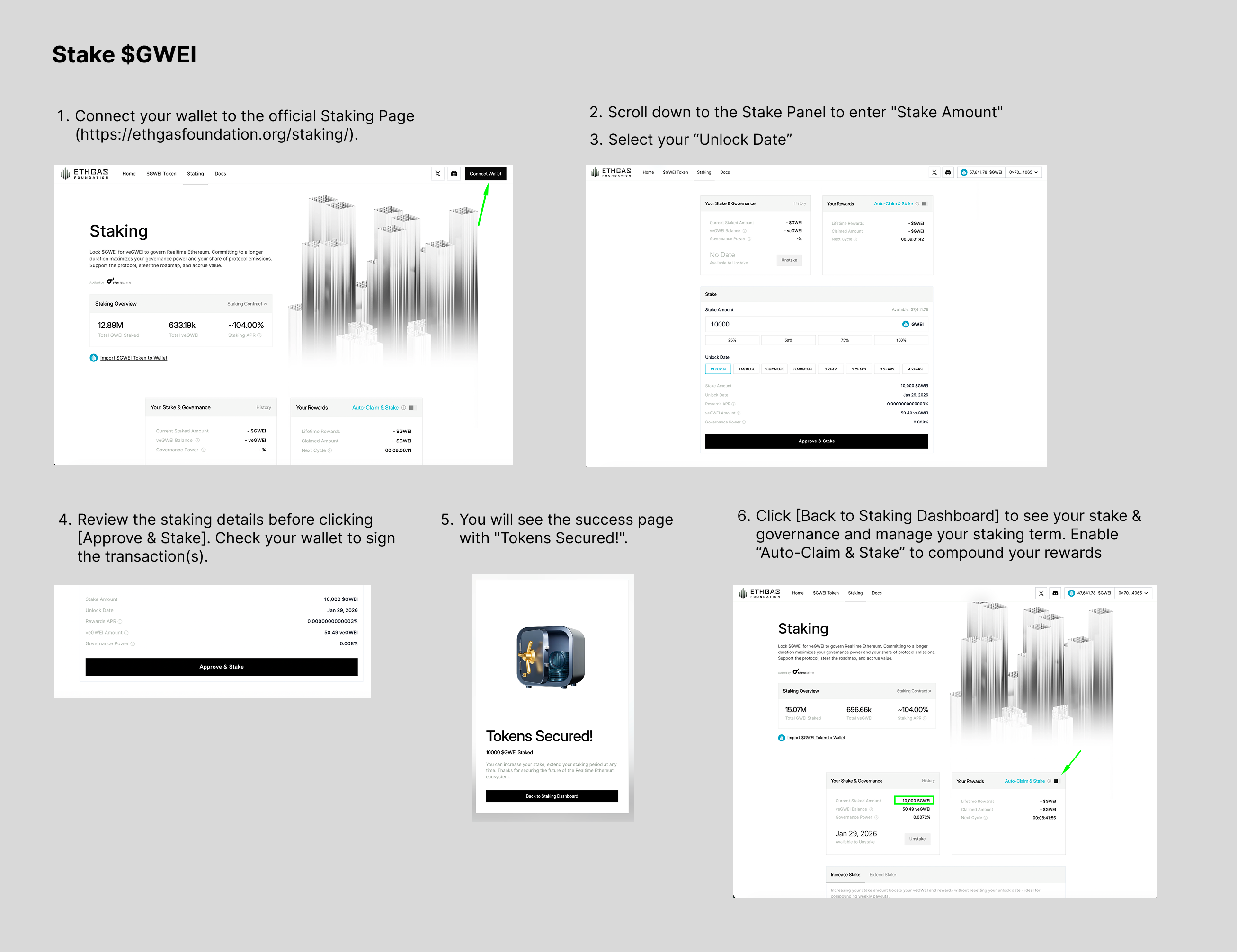
How do I stake $GWEI?
1. Connect your wallet to the official Staking Page ().
1. We strongly recommend you use Desktop for a smoother UX.
2. Scroll down to the Stake Panel to enter "Stake Amount"
1. If you don't have any $GWEI, click the "Get GWEI" button to see available exchanges
2. If your $GWEI is on BNB, you will need to [bridge your tokens to Ethereum Mainnet first](#i-have-usdgwei-on-bsc-binance-smart-chain-.-how-do-i-stake)
3. Select your "Unlock Date"
1. You must stake for a minimum of 7 days and your unlock date will be extended until end of your last active staking cycle.
2. Please note that the staking cycle resets every Thursday at 00:00 UTC so you may only choose an unlock date on Thursdays.
4. Review the staking details before clicking \[Approve & Stake]. Check your wallet to sign the transaction(s).
1. You will need to approve the spending cap of $GWEI and sign twice for `Approve` and `Stake` for your first staking transaction.
5. You will see the success page with "Tokens Secured!".
6. Click \[Back to Staking Dashboard] to see your stake & governance and manage your staking term. Enable “Auto-Claim & Stake” to compound your rewards.
What is veGWEI and how does it work?
veGWEI stands for **vote-escrowed GWEI.** It is a non-transferable token that you receive when you stake your GWEI tokens. It represents
* your governance power
* share of the weekly rewards pool
How do rewards work?
Rewards are **distributed weekly (Thursdays 00:00 UTC).** The more veGWEI you hold, the larger your governance power and share of the rewards pool.
How can I boost my rewards?
You may boost your reward by improving your veGWEI and governance power of your current stake by
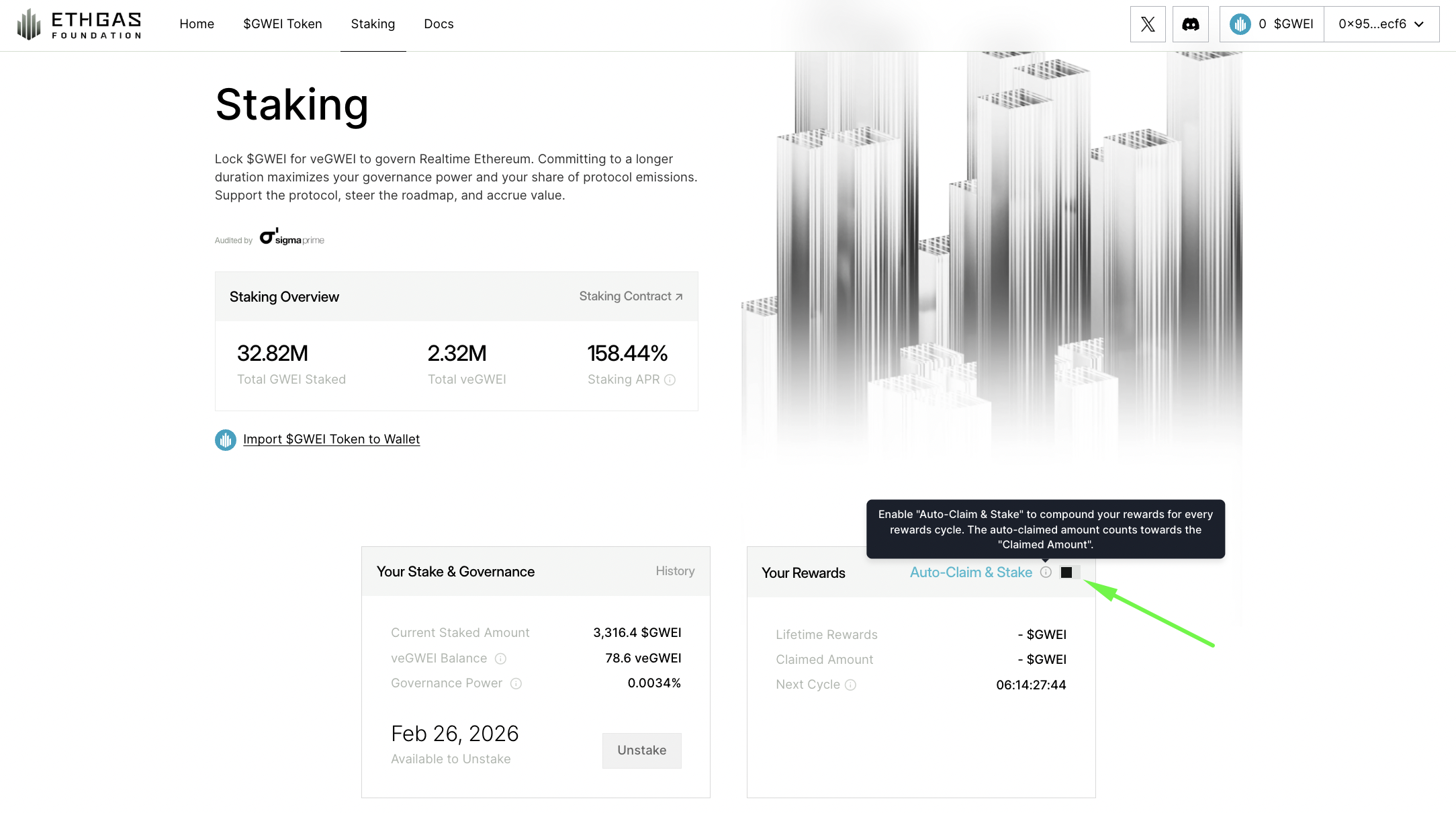
1. **Enable “Auto-Claim & Stake”** to auto-compound your weekly rewards
2. **Increase** your stake amount
3. **Extend** your staking term
In our model, **Time = Power.**
* Lock for 4 years = Max Multiplier.
* Longer locks grant you significantly more veGWEI (voting power) and yield share than shorter locks. This aligns with standard DeFi vote-escrow models (similar to Curve)
Can I increase my staking amount?
Yes, you can increase your staking amount at any time. This will add to your existing stake and increase your veGWEI and governance power.
Can I extend my staking term?
Yes, you can extend your staking term to increase your veGWEI balance and voting power. Extending the term will **lock your existing stake for a longer period.**
Can I have multiple staking terms?
No, currently you cannot have multiple staking terms. Once you have an active stake, you can only
* increase the stake amount and/or
* extend the whole staking term
Can I unstake early?
No. The veToken model is a commitment. If you lock for 1 year, your tokens are escrowed for 1 year. You cannot "rage quit" early. This protects the protocol from volatility and rewards long-term believers.
How is the Protocol-Level Staking APR calculated?
The Protocol Staking APR represents the annualized reward rate based on the current weekly reward pool relative to the total eligible staked GWEI in the system.
* **The Formula:** `(Weekly GWEI Reward × 52) ÷ Total GWEI Staked`
* **What this means:** This is the "global" rate. It gives you a snapshot of the protocol's health and the current efficiency of the reward pool before individual multipliers are applied.
How is my specific User Rewards APR determined?
**Your APR is dynamic—you can boost it by increasing your Governance Power.**\
Unlike a standard bank rate, your yield depends on your "share of the pie." This share is determined by your **Governance Power**, which you can increase by locking your stake for longer periods or staking more GWEI.
* **The Formula:** `(Weekly GWEI Reward × 52 × Your Governance Power %) ÷ Your Staked Balance`
* **Example Scenario:**
* **Weekly Reward Pool:** 1,000,000 GWEI
* **Your Staked Balance:** 3,316.4 GWEI
* **Your Governance Power:** 0.0023%
* **Result:** In this scenario, your annualized return would be approximately **36.06%**.
*By extending your staking term or increasing your stake amount, you increase your Governance Power %, directly boosting your personal APR.*
How does the "Genesis Multiplier" work?
To reward our earliest governance guardians and supporters, the first genesis reward cycle includes a massive multiplier on staking yields with 1M GWEI rewards. To capture this, you **must stake your GWEI before the first reward cycle begins on Jan 22 (00:00 UTC).**
Do I need to claim my weekly $GWEI rewards manually?
Rewards are **distributed weekly (Thursdays 00:00 UTC) after the end of each cycle.** You must stake **before the start of a cycle** to be eligible for the cycle's rewards pool.
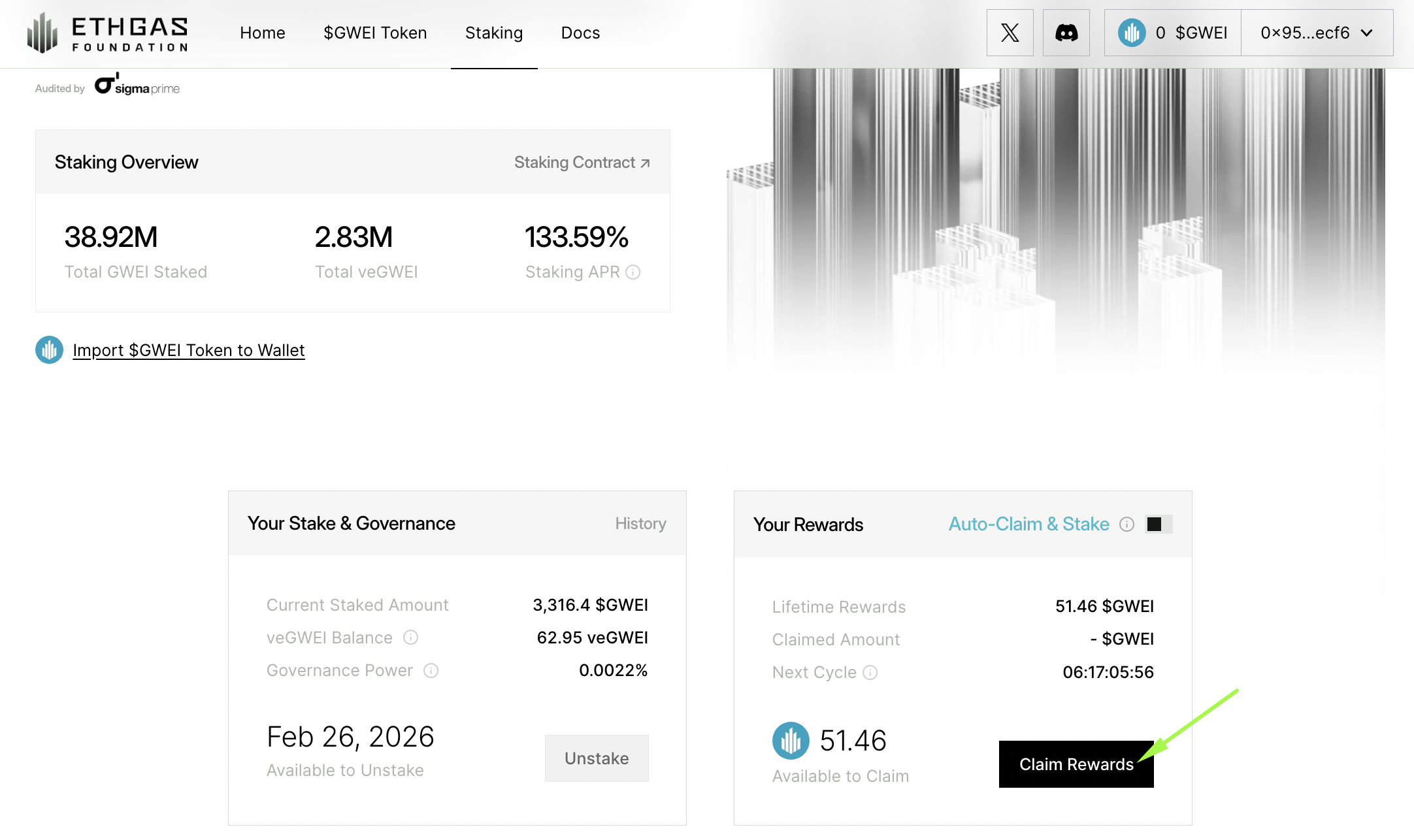
You have 3 claim rewards options via the Staking Dashboard under **"Your Rewards"**
1. **Claim:** Transfer the rewards directly to your wallet as liquid tokens.
2. **Claim & Restake (Manual compound):** Manual claim to restake to increase your veGWEI balance and voting power for future cycles based on your preferred cadence.
3. **Enable "Auto-Claim & Stake" (Auto compound):** Click to toggle ON the **“Auto-Claim & Stake” option** on the Staking Dashboard next to "Your Rewards" to auto-compound your weekly rewards. You will need to sign a transaction on your wallet to approve this weekly rewards auto-compound.
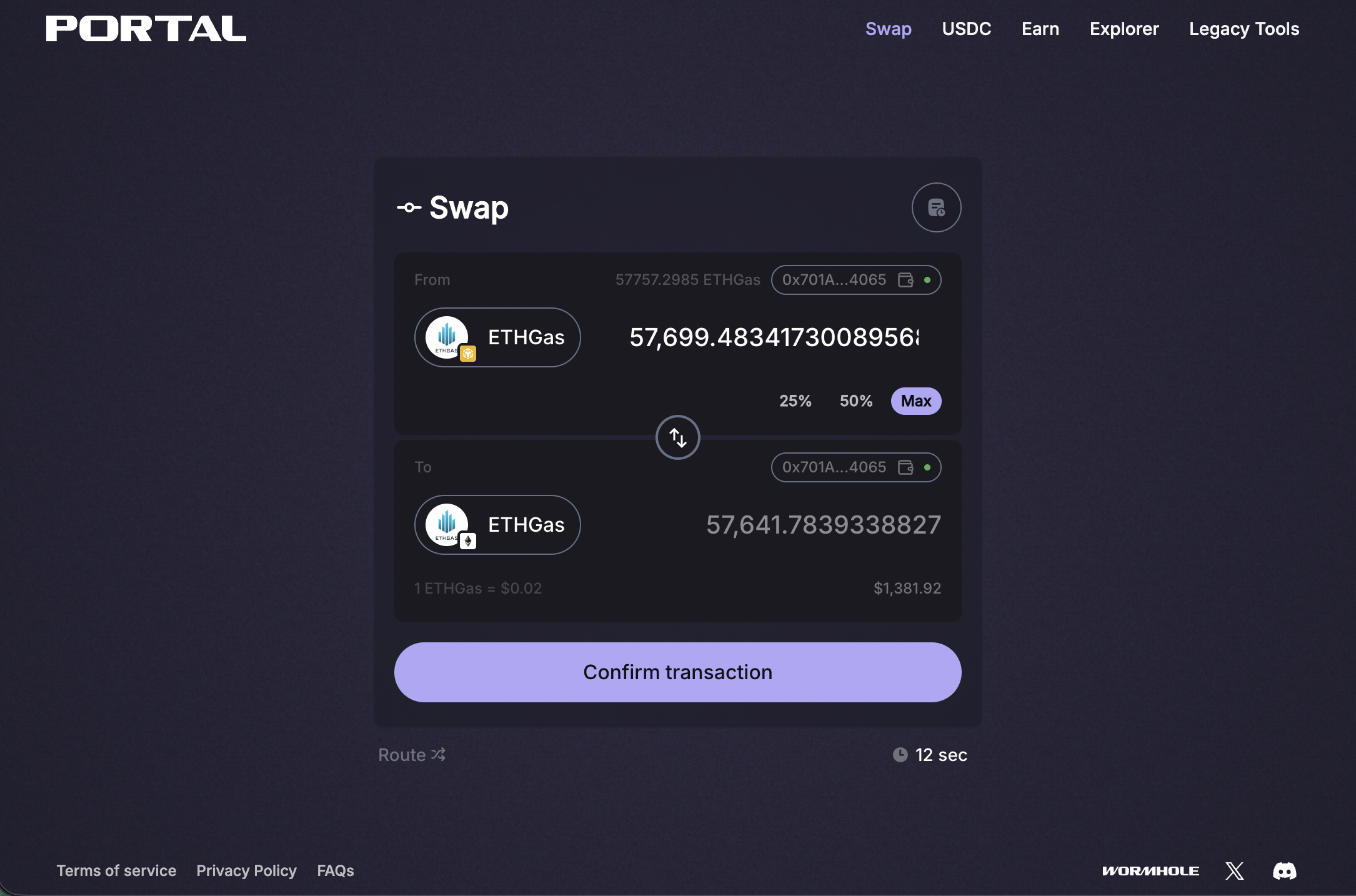
I have $GWEI on BSC (Binance Smart Chain). How do I stake?
**You must bridge your tokens to Ethereum Mainnet first.**
The $GWEI staking contract is built on Ethereum Mainnet. If you hold tokens on BSC, you cannot stake them directly.
1. **Go to Portal Bridge:**
2. **Connect Wallet:** Select the chain where you currently hold $GWEI (Source: BNB) and the destination (Target: Ethereum).
1. From: BNB `0x30117E4bC17d7B044194b76A38365C53b72F7D49`
2. To: Ethereum Mainnet `0x2798b1cC5A993085E8A9D46e80499F1B63f42204`
3. **Enter & Review the Bridge Amount:** Follow the prompts to connect your wallet, choose the bridge amount to move your assets.
4. **Confirm Bridge Transaction & Stake:** Once the funds arrive in your wallet on Ethereum Mainnet, return to the staking dashboard () to initiate your stake.
Is the $GWEI staking contract secure and audited?
**Security is the foundation of our infrastructure.**
We operate with a "security-first" mindset. We do not rely on obscurity; we rely on rigorous, top-tier verification.
* Tier-1 Audit: Our staking contract has been audited by Sigma Prime, a leading security assessment firm in the Ethereum ecosystem.
Open Source: We believe in "Verify, don't just trust." You can review our full audit reports [here](https://github.com/ethgas-developer/ethgas-audit/blob/main/Sigma_Prime_ETHGas_Token_Rebate_Escrow_Security_Assessment_Report_v3.2.pdf).
### Community Airdrop: Season 1
#### Eligibility
What criteria determine my Season 1 airdrop eligibility?
Eligibility is based on a combination of your onchain activity and the ["Gasless Future Community Program"](https://www.ethgas.com/community/overview/). We measured the following to verify if you are an active Ethereum user and advocate for ETHGas.\
\
Eligibility for the Season 1 community airdrop was determined by a snapshot of onchain activity and activity within the ["Gasless Future Community Program"](https://www.ethgas.com/community/overview/). To qualify, your wallet must have met specific Social, Engagement, and/or Onchain Activity thresholds to verify you are an active Ethereum user and advocate for ETHGas.\
\
You must meet the following three core requirements before Snapshot on Jan 19 (00:00 UTC) to be eligible:
\
**1. The Social Check (You must have completed one of the following quests on X/Twitter)**
* Shared your Gas ID on X.
* OR Quote-Tweeted (QT) the ETHGas "Open Gas Initiative" announcement.
**2. The Activity Qualifier (Must meet at least ONE)**
In addition to the Social Check and Bean Floor, you must fall into at least one of these five categories:
* **The Ethereum Active User:** Total historical gas spend on Ethereum mainnet ≥ 0.5 ETH.
* **The Discord Elite:** Ranked in the Top 100 for Discord Engage Points.
* **The Telegram Raider:** Ranked as a Top User in our Telegram community.
* **The Community Grinder:** Ranked in the Top 100 on the ETHGas Community Leaderboard
* **The Ethereum OG:** Ranked in the Top 5000 on the ETHGas Community Leaderboard AND a minimum of 1.5 ETH in gas spent on Ethereum Mainnet. These users are exempt from the social check.
**3. The Bean Floor (Mandatory)**
* You must have accumulated a minimum of 500 Beans.
Note: If you did not meet the Social Check AND the Activity Qualifier, you are not eligible, regardless of your gas spend or beans.
Why am I not eligible for the Season 1 community airdrop?
If the eligibility checker indicates you are not eligible, it is because your wallet did not meet the specific criteria captured during the **Jan 19th** **(00:00 UTC)** snapshot.
Most commonly, ineligibility is due to missing [one of the Three Mandatory Pillars](#what-criteria-determine-my-airdrop-eligibility).
Other Common Reasons:
* **Wrong Wallet:** Ensure you are connected with the **primary wallet** linked to your Gasless Future Community account.
* **Sybil / Bot Behavior:** Your address was flagged by our anti-sybil detection system for artificial patterns or bot-like activity.
* **Late Participation:** You completed the quests after the snapshot date on Jan 19 (00:00 UTC).
If you are certain you met **the core requirements** before our snapshot and would like to appeal, you may create a private ticket with your X username and primary wallet address. Jump into our Discord and head to [**#tickets channel under "SUPPORT"**](https://discord.com/channels/1202457552479195176/1369922540935581779) Why can't I see my final $GWEI amount on January 20th?
The checker will confirm ***if*** you are eligible. The final calculation of $GWEI—based on the conversion rate of Beans to tokens—will be revealed on **January 21st** when the Claim & Stake portal opens.
Will Discord “Engage Points”/Telegram “Raider Points” be considered for the upcoming airdrop?
The upcoming community airdrop will be based on your Beans and here’s the timeline of our internal operations to convert “Points” to Beans -
* **Jan 15 (00:00 UTC):** Snapshot of Engage Points/Raider Points taken.
* **Before Jan 18:** Points converted to Beans and credited to your Community Account.
* **Jan 19 (00:00 UTC):** Final snapshot of Beans and quest activity taken to calculate your airdrop eligibility and $GWEI allocation.
To ensure we can add the converted Beans to your Community Account, you **MUST complete ALL** of the following **before Jan 15 (00:00 UTC) -**
1. Onboard and create your [Gasless Future Community Account](https://www.ethgas.com/community/overview/); AND
2. Complete the “Join ETHGas Discord server” / “Join ETHGas Telegram" quest on the Community Dashboard to link your discord/telegram credentials to the Community Account
Is the Airdrop geo-restricted?
Yes. To comply with global regulatory frameworks, the Foundation website including the Tokens page for eligibility checker and claim are not accessible to users in the United States, Canada, China, OFAC-sanctioned countries, and other restricted jurisdictions.
We utilize geoblocking on the claim interface. If you believe you are being blocked in error, please consult our [Terms of Service](https://ethgasfoundation.org/terms-of-service).
My X (Twitter) account was suspended. Did I lose my future allocation?
Not if you previously generated your Gas ID.
Rest assured, your progress is saved on-chain, not on social media.
* **If you linked your wallet in Chapter 1.5:** You are safe. Your "Proof of Pain" and Gas ID are tied to your Primary Wallet, not your social handle. When the eligibility checker goes live, you will simply connect that wallet to verify your status. You do not need access to the suspended social account to check your eligibility.
* **If you never linked a wallet:** Unfortunately, we cannot verify your activity. The Gas ID generation (linking a wallet) was the mandatory step to secure your spot. Without it, there is no on-chain record of your participation.
**Why is this the policy?** We rely on X for initial Sybil resistance. According to[ X’s Enforcement Policy](https://help.x.com/en/managing-your-account/suspended-x-accounts), accounts are suspended for "severe violations of the X Rules," including platform manipulation and spam. We cannot override X’s internal security measures to verify a suspended user.
I have questions about the Community Program (Beans & Quests), where can I get help?
Please refer to the community FAQ [here](https://docs.ethgas.com/community#community-faq).
#### Claiming & Auto-Stake
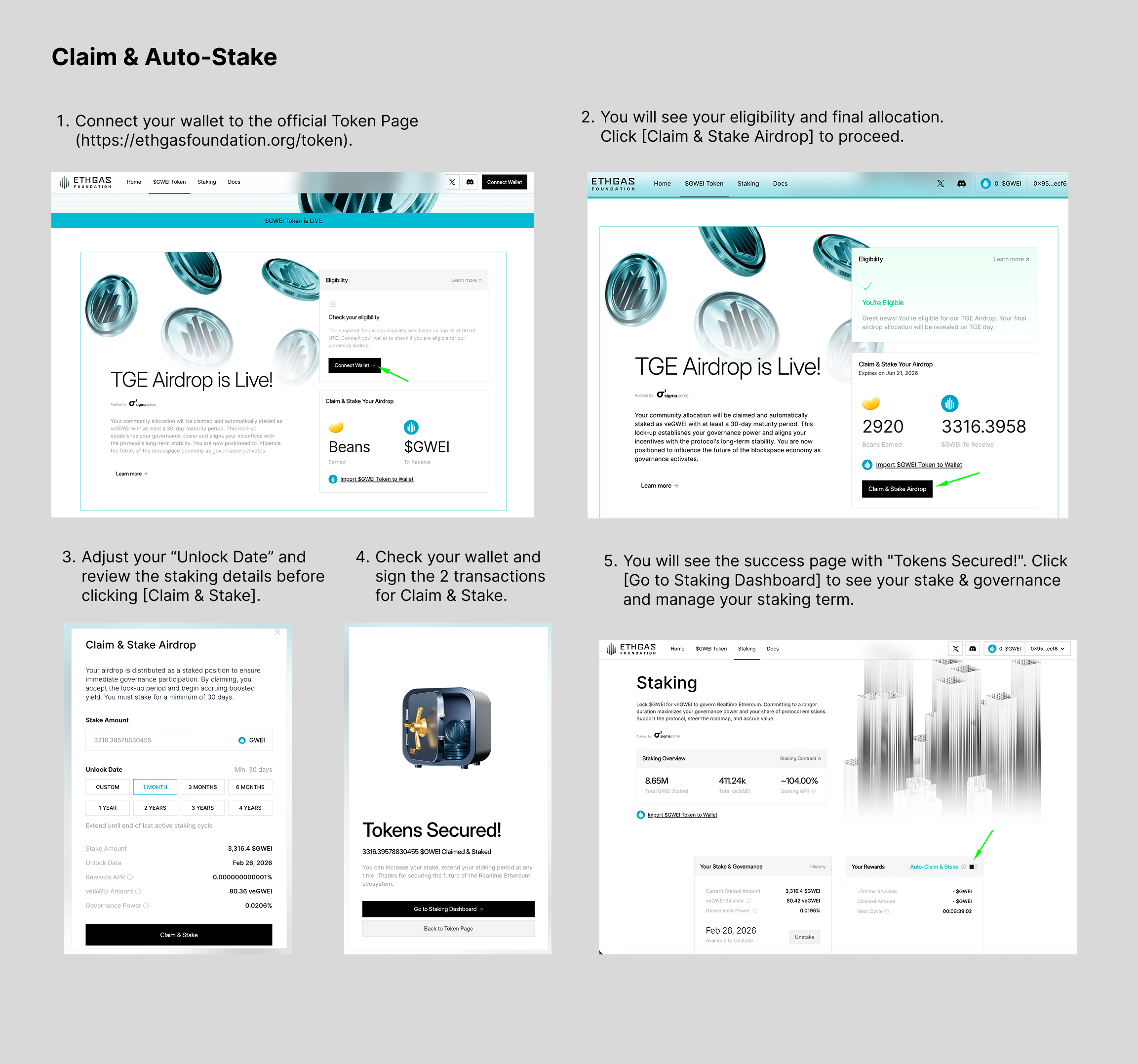
How do I claim my $GWEI?
1. Connect your wallet to the official Token Page ().
1. We strongly recommend you use Desktop to claim & auto-stake for a smoother UX.
2. You will see your eligibility and final allocation. Click \[Claim & Stake Airdrop] to proceed.
1. Your airdrop is distributed as a staked position to ensure immediate governance participation. By claiming, you accept the lock-up period and begin accruing boosted staking yield of the "Genesis Multiplier".
3. Adjust your "Unlock Date" and review the staking details before clicking \[Claim & Stake]
1. You must stake for a minimum of 30 days and your unlock date will be extended until end of your last active staking cycle.
2. Please note that the staking cycle resets every Thursday at 00:00 UTC so you may only choose an unlock date on Thursdays.
4. Check your wallet and sign the 2 transactions for Claim & Stake.
5. You will see the success page with "Tokens Secured!". Click \[Go to Staking Dashboard] to see your stake & governance and manage your staking term.
Why is my Airdrop automatically staked?
We are building a community of builders. To ensure long-term alignment, your allocation allocation is **automatically staked as veGWEI upon airdrop claiming** to initiate your status as a **Protocol Guardian.**
* **The Duration:** Your initial stake is locked for a **minimum of 30 days,** extending until the conclusion of the **last active** Weekly Staking Cycle.
* **Immediate Governance:** You receive full voting power the moment you claim.
* **Launch Boost:** During this initial phase, you automatically accrue Boosted Staking Incentives to reward your early commitment to the protocol.
Do I need ETH to claim?
Yes. Claiming is an on-chain transaction on **Ethereum Mainnet**. You will need a small amount of ETH for gas **(\~0.001 ETH).**
Should I claim my Airdrop immediately?
**Yes**. Time is a factor in your total reward calculation.
The **Boosted Staking Incentives** are heavily weighted toward the first month of the TGE (Token Generation Event). Because your airdrop is automatically staked for a minimum of 30 days upon claiming, delaying your claim results in two negative outcomes:
1. **Missed Yield:** You miss the days with the highest APY, which occurs right at launch when the reward pool is freshest.
2. **Misaligned Cycles:** If you claim late, your 30-day auto-stake will extend beyond the initial "Boosted" period. You will be locked during a period of normalized (lower) rewards, rather than capitalizing on the launch incentives.
To maximize your $GWEI allocation, claim on Day 1 to sync your staking term with the first month Boost window. What happens after the minimum 30-day staking is up?
Your initial lock-up concludes at the end of the specific Weekly Cycle that falls after your 30th day. Once this cycle finishes:
* Your tokens remain **staked (locked)**, **BUT rewards will STOP.**
* To keep earning yield, you must manually **extend** your staking term **before** your unlock date.
* Extending your term increases your voting power and locks in your yield rate. Don't let your rewards flatline!
I missed the snapshot. Can I still participate?
Yes. The ecosystem is just getting started.
While the snapshot for the **initial Season 1** "Gasless Future Community Program" (Chapters 1-4) has concluded, there are two major ways to participate moving forward:
1. **Staking & Yield:** Post-TGE, you can **get $GWEI** on the open market and stake it in the Staking Dashboard for the first cycle of "Genesis Multiplier of 1M rewards". This allows new users to earn rewards alongside early adopters.
2. **Season 2 Community Program:** We are preparing to launch Season 2, featuring a fresh set of quests, partners, and rewards. Stay tuned to our socials @ETHGasOfficial for the kickoff announcement.
---
# Agent Instructions
This documentation is published with GitBook. GitBook is the documentation platform designed so that both humans and AI agents can read, navigate, and reason over technical content effectively. Learn more at gitbook.com.
## Querying This Documentation
If you need additional information that is not directly available in this page, you can query the documentation dynamically by asking a question.
Perform an HTTP GET request on the following URL with the `ask` and `goal` query parameters:
```
GET https://docs.ethgas.com/foundation/foundation-faq.md?ask=&goal=
```
`ask` is the immediate question: it should be specific, self-contained, and written in natural language.
`goal` is what the user is ultimately trying to achieve, the reason they need the answer. Sharing it helps GitBook give you a better, more relevant answer. A goal is most helpful when it describes the outcome the user wants rather than restating the question. For example, with `ask=how do I create an API token`, a goal like `build a script that syncs our docs to a CMS` lets GitBook tailor the answer to that use case.
The response will contain a direct answer to the question and relevant excerpts and sources from the documentation.
Use this mechanism when the answer is not explicitly present in the current page, you need clarification or additional context, or you want to retrieve related documentation sections.